The Problem: Strong Passwords Need to be Shareable
Creating strong, memorable passwords is hard. Creating shared passwords that multiple people need to use is harder. And doing all this securely—without email plaintext, no cloud storage, no screenshots—is nearly impossible.
Enter Diceware: a method for generating passphrase by simulating dice rolls. Combined with cryptographic randomness and an offline-first design, it solves this problem elegantly.
What is Diceware?
Diceware is a well-established, publicly documented method for generating passphrases using physical dice (or simulated rolls). The core idea:
- Five-dice rolls → a 5-digit key (e.g., “32541”)
- Lookup → find that key in a curated wordlist (e.g., “glitter”)
- Repeat → combine multiple words into a passphrase
Each word contributes approximately 12.9 bits of entropy. A 4-word passphrase reaches ~51.7 bits—strong enough for most purposes, memorable enough to recite verbally, and portable enough to write on paper.
The Offline HTML Generator
Note: The
diceware.htmltool is the most accessible, offline-friendly piece of this project — it’s highlighted first so readers can use it immediately without installing anything.
For scenarios where PowerShell isn’t available—or when you need a tool that doesn’t require installing anything—there’s diceware.html: a completely self-contained, single-file generator that runs in any modern browser with zero dependencies. This has won my heart as the most useful part of my diceware strategy: now you can generate, store, and recover passphrases with a simple HTML file that you can run on a trusted, clean system.
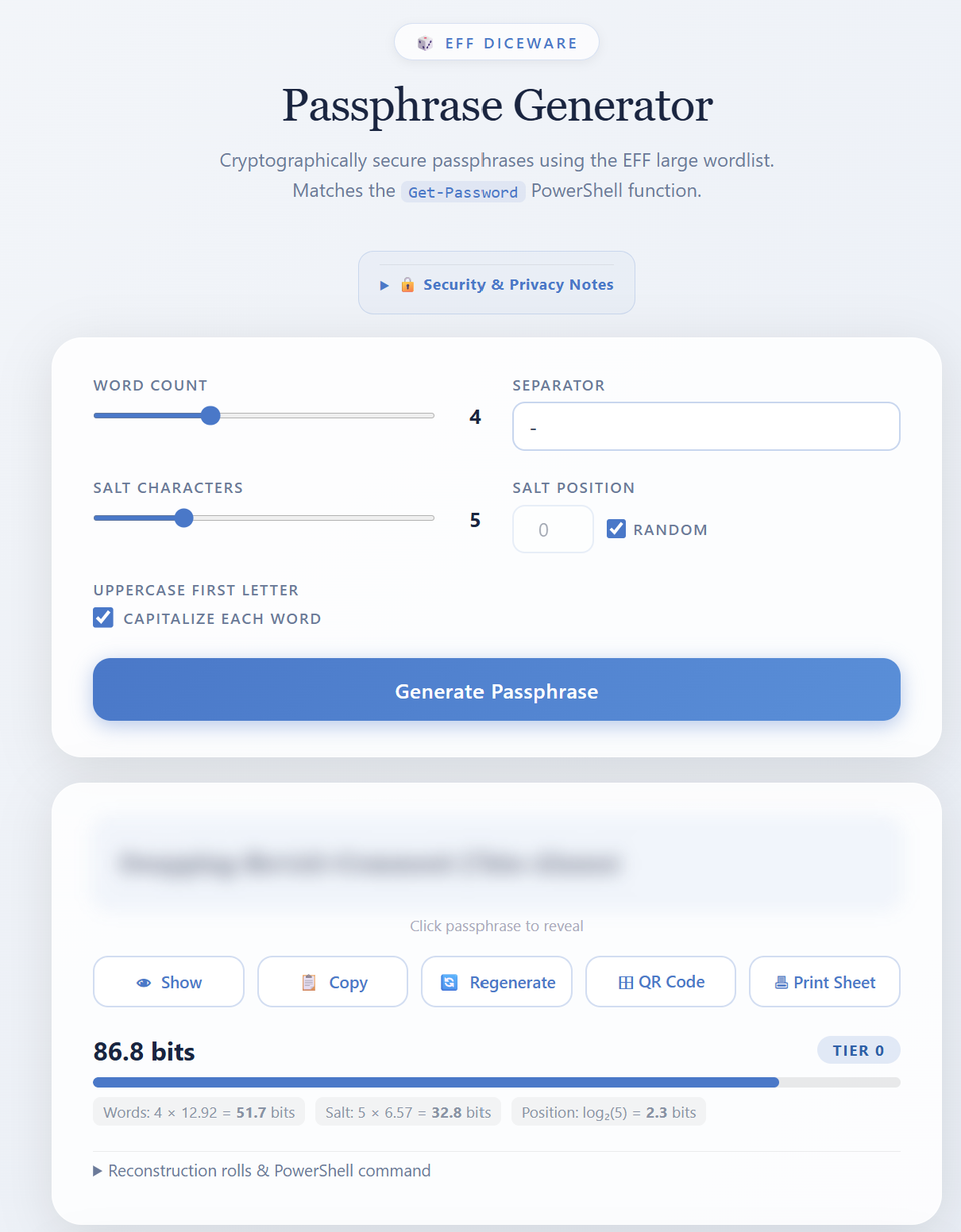
If the integrity of the client system is not compromised, it should be a fairly safe place to run, generate and print or record offline copies of the passphrase. Using the steganography feature you can obfuscate and store your password recovery key & password data locally.
This page is a modification of the original diceware generator from github.com/mannyme23/diceware-generator, adapted here for offline use with the same Diceware workflow.
Why Offline Matters
- No network requests: All JavaScript, wordlist, and QR libraries are embedded inline
- No installation: Just open the file from your filesystem
- No server: Runs entirely in your browser
- Verifiable: Check file integrity with SHA-256 before use
- Portable: Share the file; works identically on any machine
Key Features
Live Passphrase Generation Generate new passphrases instantly with real-time entropy display showing your strength tier.
Blurred Output Passphrases are hidden by default—click Show to reveal for safety and privacy.
Reconstruction from Rolls Paste previously saved rolls (or a JSON file) to regenerate the exact same passphrase. Perfect for recovery or verification.
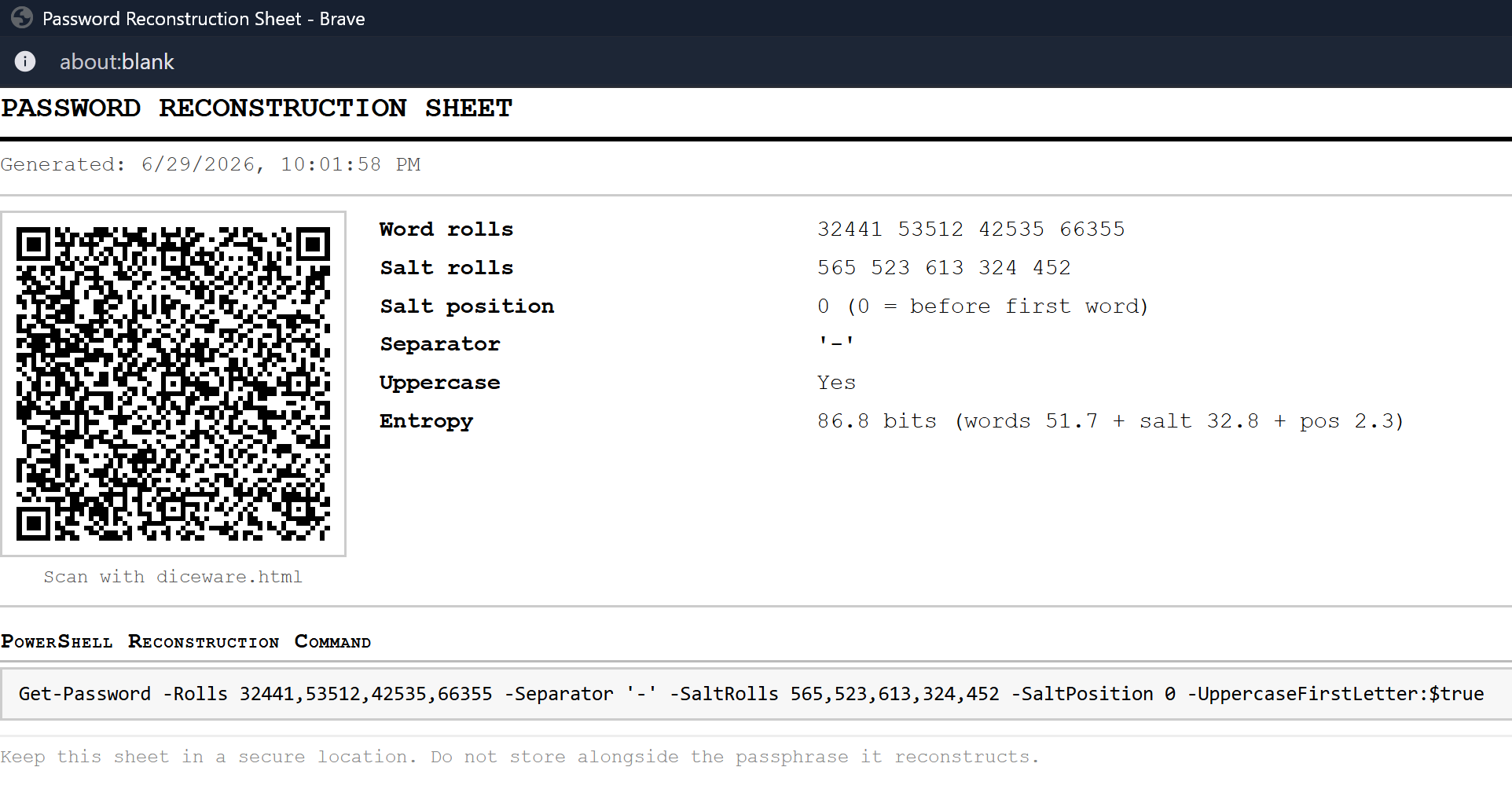
JSON Export Copy or download your rolls and settings as JSON for secure storage and reconstruction:
{
    "Rolls": [32441, 53512, 42535, 66355],
    "SaltRolls": [565, 523, 613, 324, 452],
    "SaltPosition": 0,
    "Separator": "-",
    "UppercaseFirstLetter": true
}
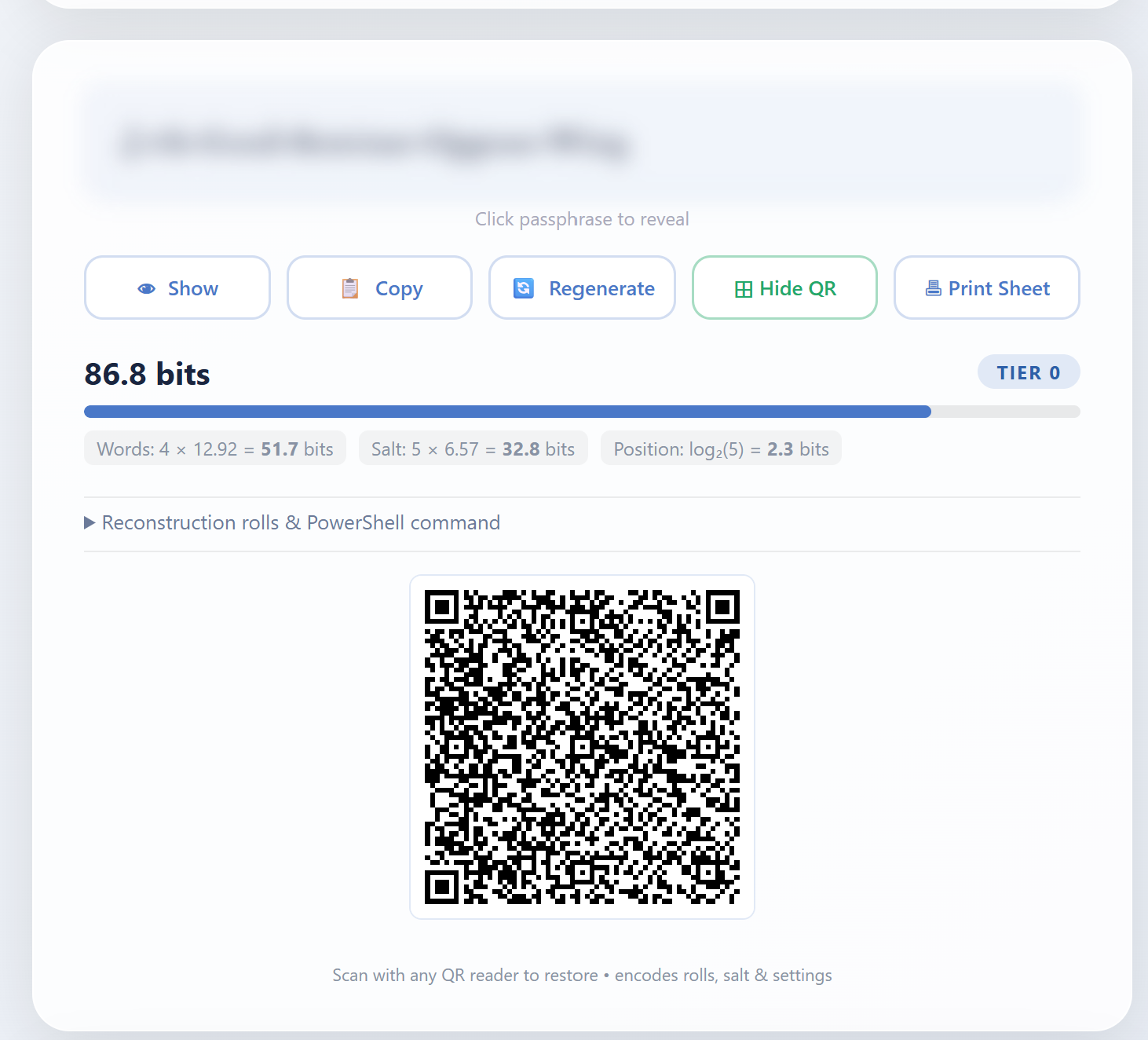
QR Code Generation Encode your rolls + settings as a QR code; scan on another device to instantly reconstruct without typing.
 Entropy Breakdown
See bits of entropy per component and your overall passphrase strength tier (🟢 strong, 🟡 good, 🔴 weak).
Entropy Breakdown
See bits of entropy per component and your overall passphrase strength tier (🟢 strong, 🟡 good, 🔴 weak).
Print Sheet Generate an A4 printable sheet with QR code, roll data table, and reconstruction instructions—no passphrase text printed for safety.
Offline Security Notice Clear guidance on safe usage patterns and how to verify file integrity before each use.
Using the HTML Tool
- Download: Save
diceware.htmllocally (right-click → Save As) or use one of these commands.
Windows PowerShell
iwr "https://raw.githubusercontent.com/pwshfoo/DicewareNewPassword/refs/heads/main/diceware.html" -OutFile "diceware.html"
iwr "https://raw.githubusercontent.com/pwshfoo/DicewareNewPassword/refs/heads/main/diceware.html.SHA256" -OutFile "diceware.html.SHA256"
if ((Get-FileHash ".\diceware.html" -Algorithm SHA256).Hash -eq (Get-Content ".\diceware.html.SHA256")) {
  Write-Host "MATCH: File is secure!" -ForegroundColor Green
} else {
  Write-Warning "MISMATCH: Do not use this file!"
}
Linux / macOS
curl -sL https://raw.githubusercontent.com/pwshfoo/DicewareNewPassword/refs/heads/main/diceware.html -o diceware.html
a=$(sha256sum diceware.html | awk '{print $1}' | tr -cd '[:alnum:]' | tr '[:upper:]' '[:lower:]')
e=$(curl -sL https://raw.githubusercontent.com/pwshfoo/DicewareNewPassword/refs/heads/main/diceware.html.SHA256 | awk '{print $1}' | tr -cd '[:alnum:]' | tr '[:upper:]' '[:lower:]')
[[ "$a" == "$e" ]] && echo "MATCH: File is secure!" || echo "MISMATCH: Do not use this file!"
- Verify: Check SHA-256 hash against
diceware.html.SHA256 - Open: Launch your browser in Private or Incognito mode, then open the file from disk (no server, no history saved)
- Generate: (Optional: Disconnect network for maximum paranoia) Adjust settings (word count, separator, salt) and click Generate
- Share the recipe: Export rolls as JSON or QR code, but never share the passphrase itself
The NewPassword Module
This repo began as a revamp of older account-creation NewPassword Module. I wanted memorable and recoverable passwords that could be shared securely with colleagues, friends & family.
The NewPassword PowerShell module brings diceware generation to PowerShell 5.1 and 7.x with full cryptographic security:
Key Features
- Cryptographically secure randomness: Uses
RNGCryptoServiceProvider(PS5.1) orRandomNumberGenerator.Fill(PS7+) - EFF large wordlist: All 7,776 words included; one-to-one mapping with 5-digit keys
- Flexible configuration:
- Word count (1–10 words)
- Custom separators (e.g.,
-, space, empty) - Optional salt characters (randomly generated symbols inserted at a position)
- Uppercase first letter toggle
- Output modes:
SecureStringby default (minimal plaintext exposure)- PlainText option for scripting
- JSON export for reconstruction and sharing
- Advanced features:
- Encrypt and save passwords with AES-256
- Hide encryption keys and passwords in images using LSB steganography
- Reconstruct a passphrase from saved rolls (for verification or sharing the recipe, not the secret)
Basic Usage
# Generate a 4-word passphrase
New-Password

# Output:
# Password             Rolls              SaltPosition SaltChars Separator UppercaseFirstLetter
# --------             -----              ------------ --------- --------- --------------------
# Cheddar-Crabgrass-A… {23124, 25624, …} -1           0         -         True

# Generate with salt characters
New-Password -SaltChars 4 -SaltPosition 2

# 5 words, space-separated, no uppercase
New-Password -WordCount 5 -Separator ' ' -UppercaseFirstLetter $false

# Export as plain text (e.g., for display or external use)
New-Password -PlainText
The Offline HTML Generator
For scenarios where PowerShell isn’t available—or when you need a tool that doesn’t require installing anything—there’s diceware.html: a completely self-contained, single-file generator that runs in any modern browser with zero dependencies. This is actually has won my heart as the most useful part of my diceware strategy; Now you can generate, store, recover passwords with a simple html file that you can run on a trusted clean source. If the integrity of the client system is not compromised then it should be fairly safe place to run, generate and print or record offline copies of the password; Using the steganography feature you could obfuscate and store your password recovery key & password data locally.
This page is a modification of the original diceware generator from github.com/mannyme23/diceware-generator, adapted here for offline use with the same Diceware workflow.
Why Offline Matters
- No network requests: All JavaScript, wordlist, and QR libraries are embedded inline
- No installation: Just open the file from your filesystem
- No server: Runs entirely in your browser
- Verifiable: Check file integrity with SHA-256 before use
- Portable: Share the file; works identically on any machine
Features at a Glance
| Feature | Benefit |
|---|---|
| Live passphrase generation | Generate new passphrases instantly; entropy display shows strength tier |
| Blurred output | Passphrase is blurred by default; click Show to reveal |
| Reconstruction from rolls | Paste the rolls (or a saved JSON) to regenerate the exact same passphrase |
| JSON export | Copy or download the rolls and settings as JSON for later reconstruction |
| QR code generation | Encode rolls + settings as a QR code; scan on another device to reconstruct |
| Entropy breakdown | See bits of entropy per component and total strength tier |
| Print sheet | A4 single-page sheet with QR code, roll data table, and reconstruction command (no passphrase text printed) |
| Offline security notice | Clear guidance on safe usage and verification |
Using the HTML Tool
- Download: Save
diceware.htmllocally (right-click → Save As) - Verify: Check SHA-256 hash against
diceware.html.SHA256 - Open: Launch your browser in Private or Incognito mode, then open the file from disk (no server, no history saved)
- Generate: (Optional: Disconnect network for maximum paranoia) Adjust settings (word count, separator, salt) and click Generate
- Share the recipe: Export rolls as JSON or QR code, but never share the passphrase itself
Why This Matters: Secure Offline Sharing
Scenario 1: Team Credentials
A small team needs to share database credentials or API keys. Instead of:
- ❌ Emailing plaintext
- ❌ Storing in shared cloud docs
- ❌ Writing on a sticky note
You can:
- ✅ Generate a passphrase with
New-Password - ✅ Read it aloud to each team member (no recording)
- ✅ Each person types it in; passphrase never written down
- ✅ If someone leaves, regenerate and redistribute
Scenario 2: Physical Backup
You want a strong passphrase you can write down and store securely:
- ✅ Generate with
New-Password(or the HTML tool) - ✅ Print the passphrase worksheet or save the dice rolls + settings to a physical backup
- ✅ Store it in a safe, fireproof box, or other secure offline location
- ✅ Later, open
diceware.html, scan the QR, or manually enter the rolls and settings to reconstruct the passphrase
This makes the tool ideal for a “glass breaker” account password: keep the printed worksheet offline in case you need emergency access later, and reconstruct the same passphrase when the day comes.
Scenario 3: In-Person Account Recovery
Someone needs to recover a shared account and can’t access email:
- ✅ QR code is scanned or rolls are read aloud
- ✅ Open
diceware.htmlon any device - ✅ Paste rolls into Reconstruct card
- ✅ Passphrase is re-derived instantly, no storage required
Entropy and Security
A diceware passphrase’s strength comes from:
- Word choice: 7,776 possible words (2^12.9 per word)
- Number of words: 4 words = ~51.7 bits (reasonable for most scenarios)
- Salt: 5 random characters add ~26 additional bits
- Unpredictability: Each roll uses cryptographic randomness, not pseudo-random
For reference:
- 🟢 50+ bits: Strong; resists brute-force for years
- 🟡 40–50 bits: Good for accounts with rate-limiting; weak against offline attacks
- 🔴 <40 bits: Insufficient for high-value targets
4-word diceware with 5-character salt → ~77.7 bits ✅
Getting Started
PowerShell Module
# Clone or download from https://github.com/pwshfoo/DicewareNewPassword
Import-Module ./NewPassword.psm1

# Generate your first passphrase
New-Password -WordCount 5 -SaltChars 6

# Export as JSON for reconstruction
New-Password | ConvertTo-Json | Set-Clipboard
HTML Tool
- Try online: https://go.pwsh.foo/diceware (or https://pwshfoo.github.io/DicewareNewPassword/diceware.html)
- For best security: Download
diceware.htmllocally and verify its SHA-256 hash matchesdiceware.html.sha256 - Open the file in any modern browser—no installation or server needed
- Adjust settings (word count, separator, salt) as needed
- Click Generate Passphrase, then Show to reveal, Copy to clipboard, Export JSON, or Generate QR
Security Best Practices
- Verify file integrity: Always check SHA-256 before using downloaded copies of
diceware.html - Save locally: Download and open from disk; never run from a cloud link
- Don’t screenshot passphrases: Use QR codes or JSON exports instead
- Distribute rolls, not secrets: Share the QR code or JSON (which contains only the rolls/recipe), never the passphrase itself
- Use salt: Add random characters to increase entropy
- Memorize or destroy: After sharing, either memorize the passphrase or securely wipe records of it
Conclusion
Diceware + cryptographic randomness + offline-first design = a simple, secure, and surprisingly practical way to generate and share strong passphrases without compromising security or convenience.
Whether you’re securing team credentials, protecting a shared account, or just generating a memorable passphrase you can recite aloud, the NewPassword module and diceware.html tool offer a modern take on a proven method.
Try it today: Generate a passphrase, scan the QR code, and see how it feels to use a password that’s both strong and shareable.
Get Started:
- Repository: github.com/pwshfoo/DicewareNewPassword
- Try it online: https://go.pwsh.foo/diceware
- Download: https://pwshfoo.github.io/DicewareNewPassword/diceware.html (verify SHA-256 before use)
Learn more: